
Overview

The Query Component is an SSIS Data Flow Component providing the ability to retrieve data from a SQL database by defining data flow input columns as query keys. The Query component supports a variety of connection types as a source.

Demonstration
Parameters
General
The General page is used to define the component source database and statement.
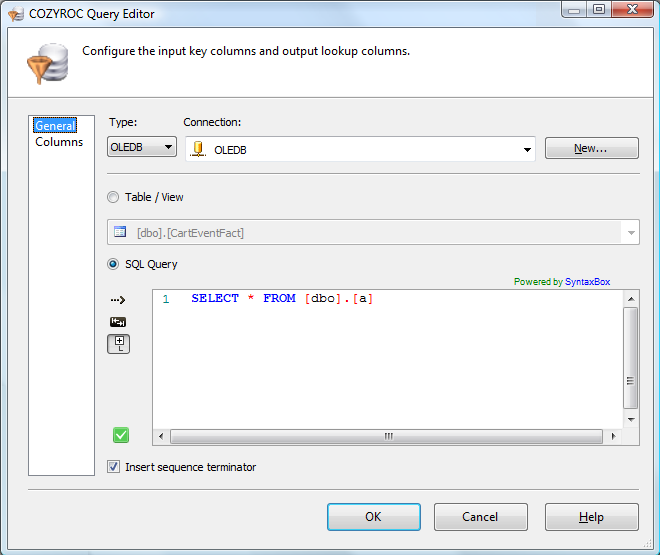
Select the connection type. This parameter has the options listed in the following table.
Value Description OLEDB Use the OLEDB Connection Manager for the Connection option. ADO Use the ADO Connection Manager for the Connection option. ADO.NET Use the ADO.NET Connection Manager for the Connection option. PostgreSQL Use the PostgreSQL Connection Manager for the Connection option. Select an existing connection manager.
Click New to create a new connection manager.
Related Topics: OLE DB Connection Manager, ADO Connection Manager, ADO.NET Connection Manager, PostgreSQL Connection Manager
Select an existing table or view as the query source.
Specify an SQL statement as the query source.
Indicates whether an empty line should be inserted at the end of each set of records returned by the query. The default is true.
Options Description True Empty line will be inserted. False Empty line will not be inserted.
Columns
The Columns page is used to set up the query key columns and output columns.
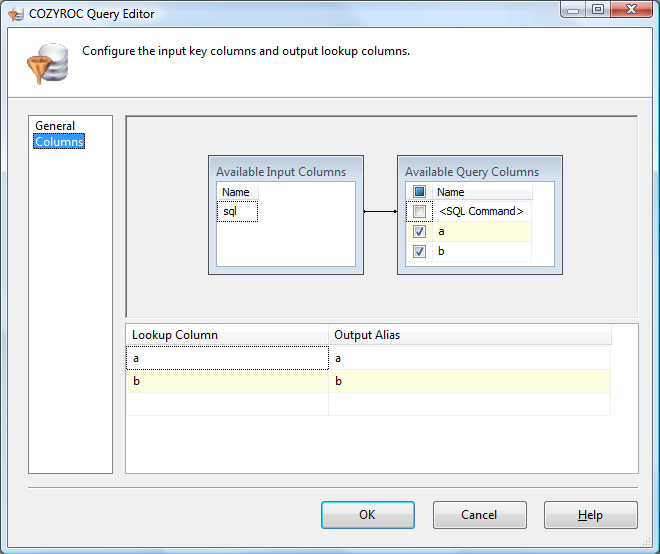
List of available input columns from the upstream data flow component. Connect only the key column(s) to available lookup columns to use as query key columns.
List of available columns in the records being searched. Use the check boxes to include columns in output.
is a special query column. This allows you to provide a SQL statement from upstream to be used for the query. Map it to the input column containing the statement to populate the SQL statement the Query will use with content from the input row. Select lookup column to include in output.
Specify output column name. The default is the name of the lookup column.
What's New
- New: PostgreSQL Connection Manager support.
- Fixed: NULL result was incorrectly returned as integer 0 result (Thank you, Ingrid).
- Fixed: Failed when input lookup parameter was NULL (Thank you, Don).
- New: Introduced component.
Related documentation


COZYROC SSIS+ Components Suite is free for testing in your development environment.
A licensed version can be deployed on-premises, on Azure-SSIS IR and on COZYROC Cloud.