
Overview

Configuration is provided for establishing connections with the IBM Cloud Storage Connection service. The configuration is used in the REST Connection Manager.
Setup
Press  icon to get more information about the connection parameters.
Obtain data
Use REST Source component to get data from service resource.
Insert data
Use REST Destination component to insert data into service resource.
Manage remote files and directories
Use File Transfer Task to manage remote files and directories.
Advanced settings for managing file uploads
When uploading a file optional request headers can be specified. The headers can be specified in the File Transfer Task property AdditionalOptions. The property is optional and can be shown by clicking the Expand Options button.
The format of the property is [header name]=[value]. Multiple headers are separated by newline.
Example how to set canned access control list and server-side encryption:
x-amz-acl=private
x-amz-server-side-encryption=AES256
To get full list of available headers for small files smaller than 20MB go to PutObject. For large files go to CreateMultipartUpload.
Quick Start
In this QS, we will show you step-by-step how to create a connection to an IBM Cloud Storage REST API using COZYROC's REST Connection Manager.
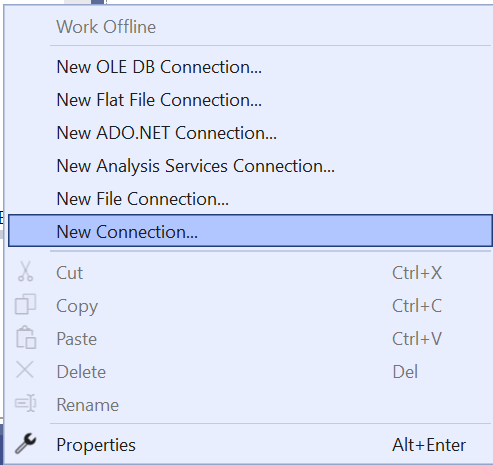
Step 1. Run "Visual Studio" and right click on Connection Managers tab and select New Connection.
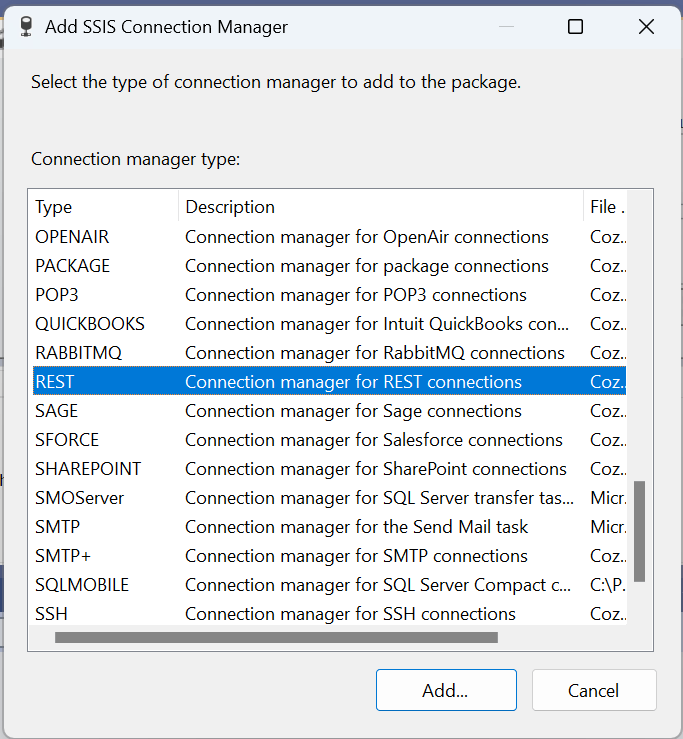
Step 2. Then an "Add SSIS Connection Manager" popup window opens, scroll down and select "Connection managers for REST Connection" then click Add.
Step 3. From the Configuration drop down menu select IBM Cloud Storage.
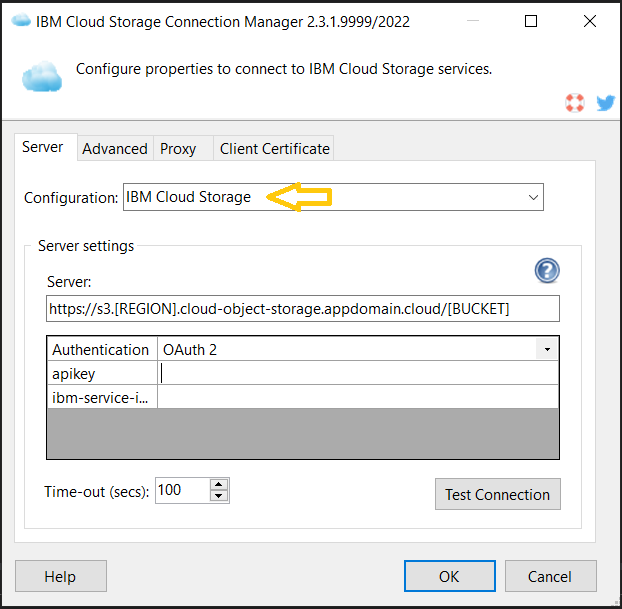
Step 4. You will see the following window.
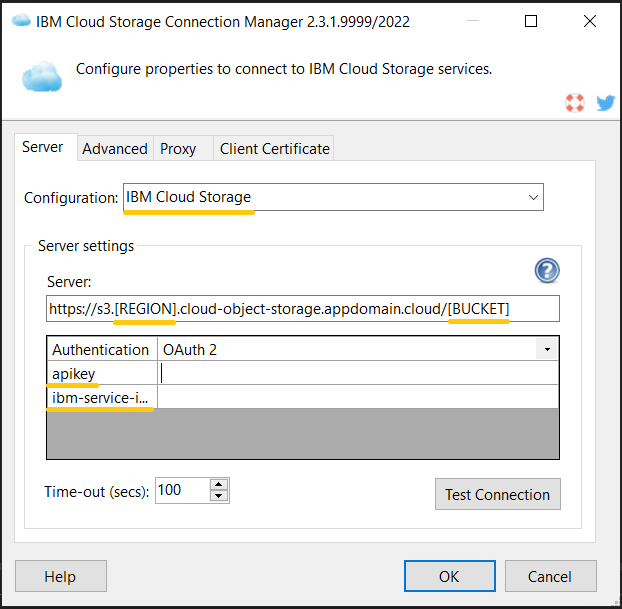
Step 5. Provide the relevant [BUCKET] and [REGION] in the "Server" address field, as well as the apikey and ibm-service-instance-id.
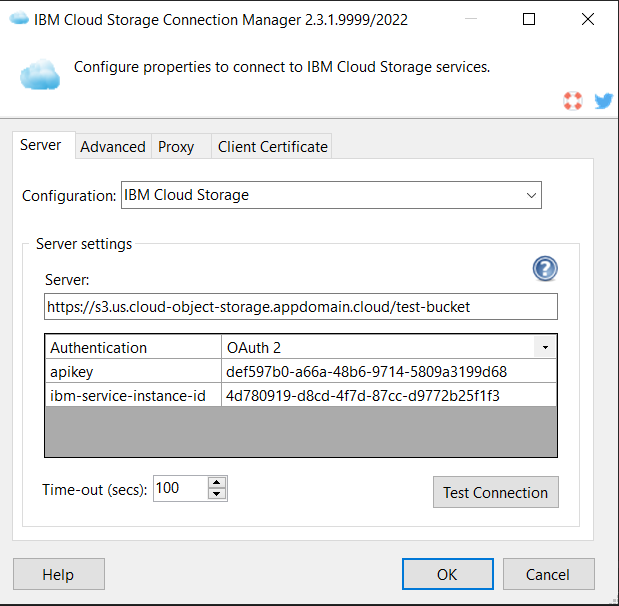
Step 6. Test your connection by clicking Test Connection button.
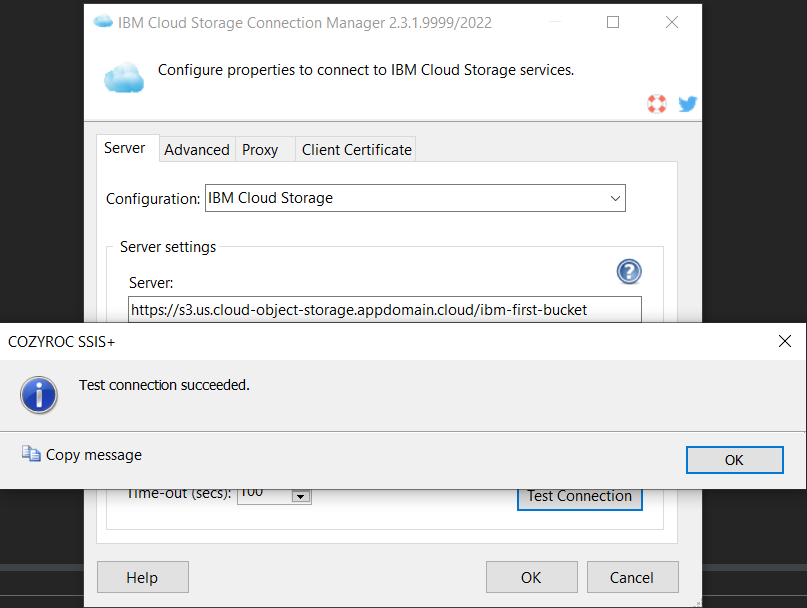
Congratulations! You have successfully created a connection to an IBM Cloud Storage REST API using COZYROC's REST Connection Manager.
IBM's documentation on HMAC can be found here.
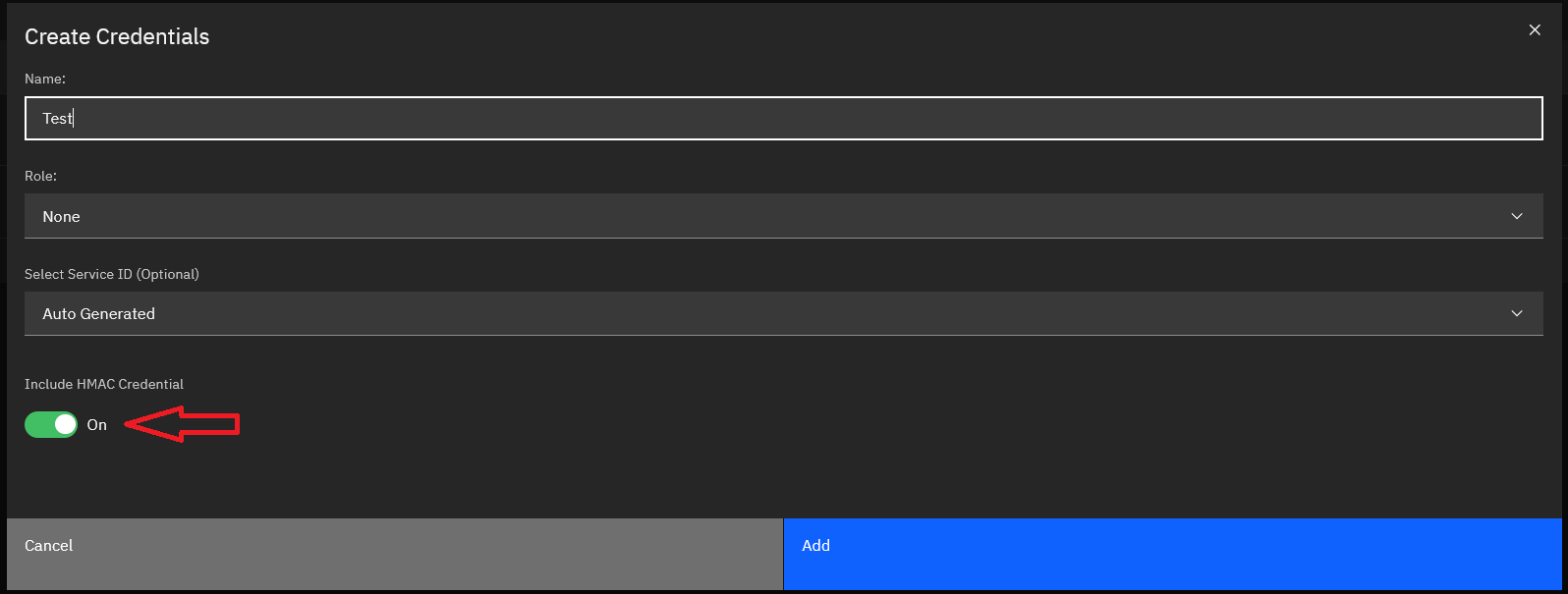
Step 1. Generate the HMAC access_key and secret_access_key in the IBM CLI or the console UI.
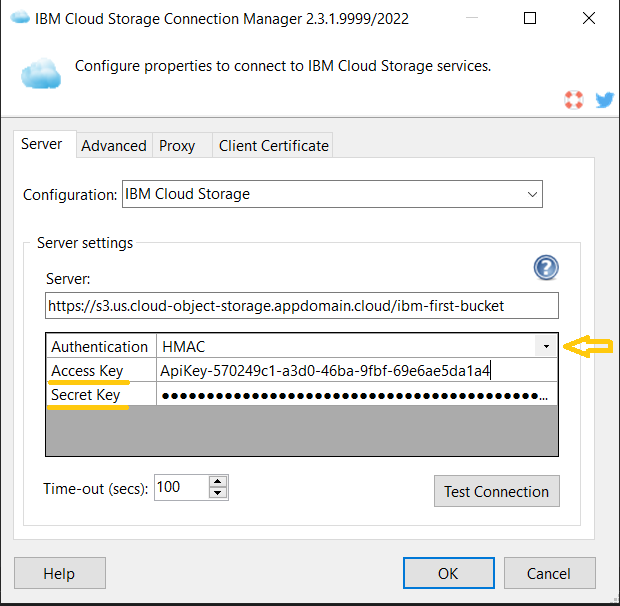
Step 2. From the Authentication dropdown, select HMAC and input the credentials generated in the first step.
Step 3. Test your connection by clicking Test Connection button.
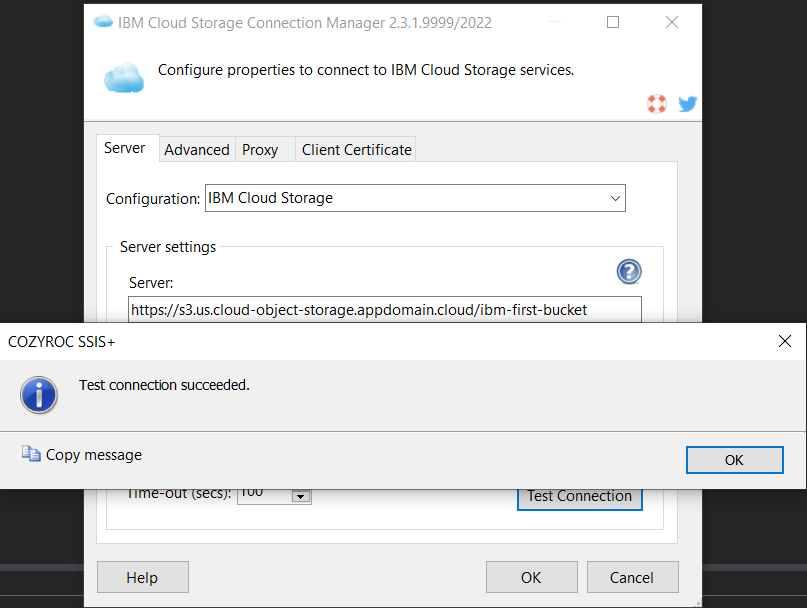
Congratulations! You have successfully created a connection to an IBM Cloud Storage REST API using COZYROC's REST Connection Manager.
In this guide, we will show you how to read data from the IBM Cloud Storage Service resource using the COZYROC REST Source component.
Step 1. Select an existing or create a new "Data Flow Task".
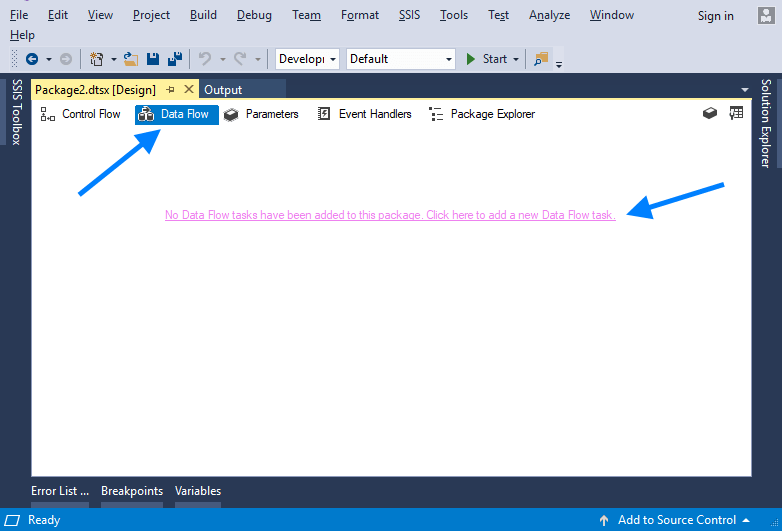
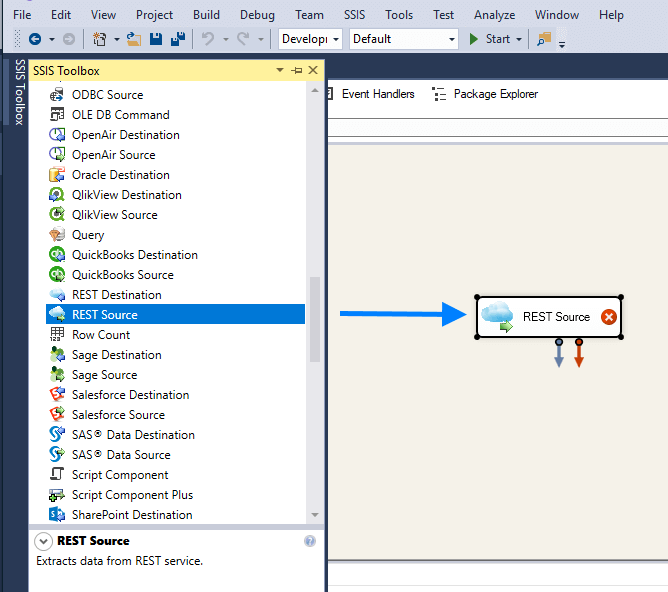
Step 2. Open the "SSIS Toolbox" and drag and drop a COZYROC "REST Source" component.
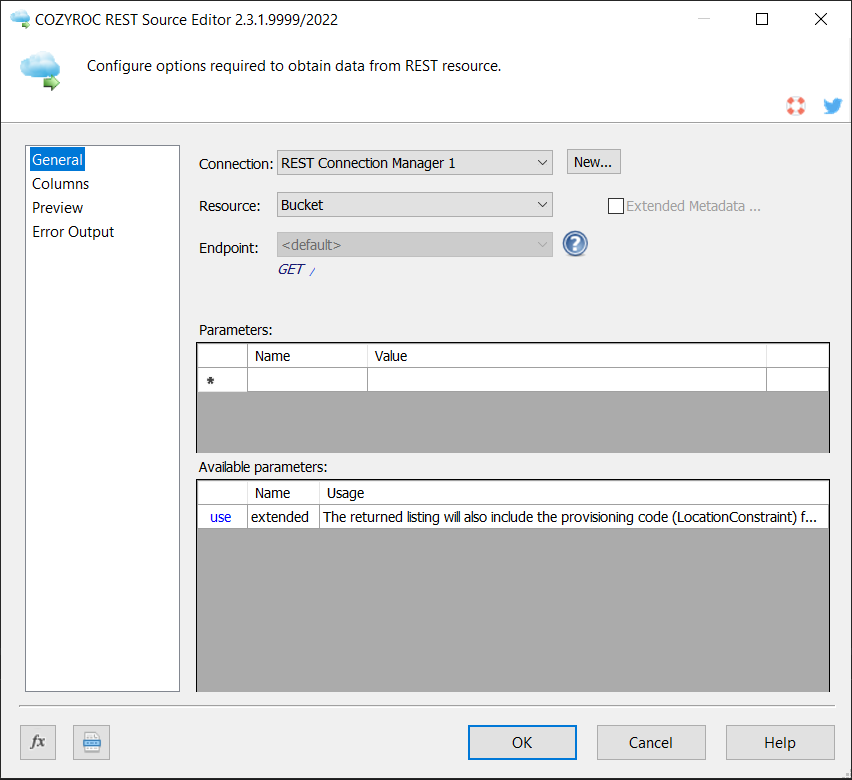
Step 3. Double click on the "REST Source" component and select an IBM Cloud Storage connection from the list. Select from the available IBM Cloud Storage resources listed in the second list below.
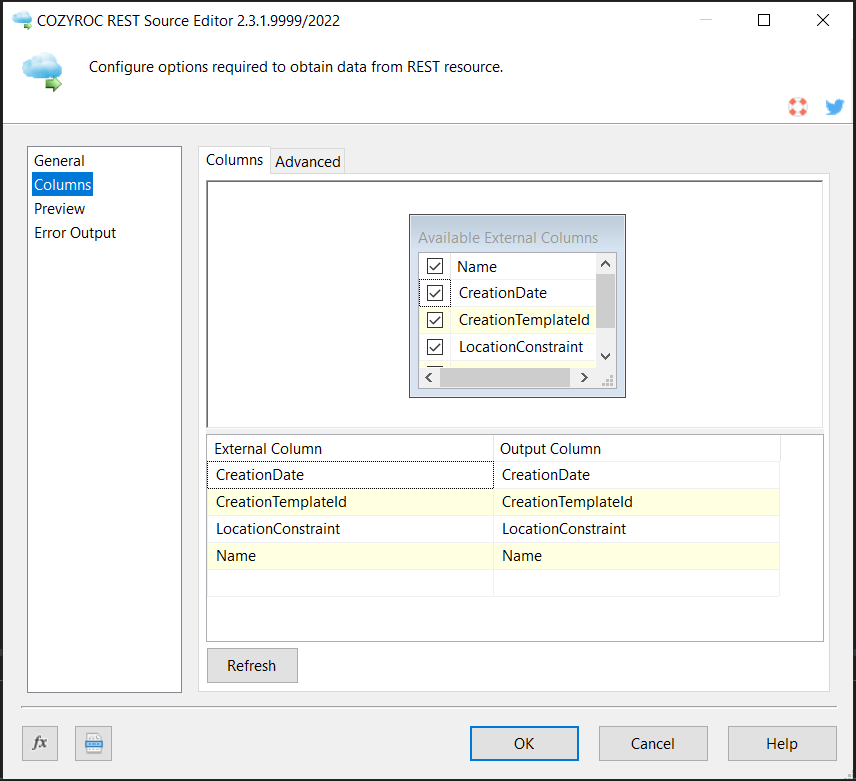
Step 4. Click on the "Columns" tab and select IBM Cloud Storage resource columns you want to read.
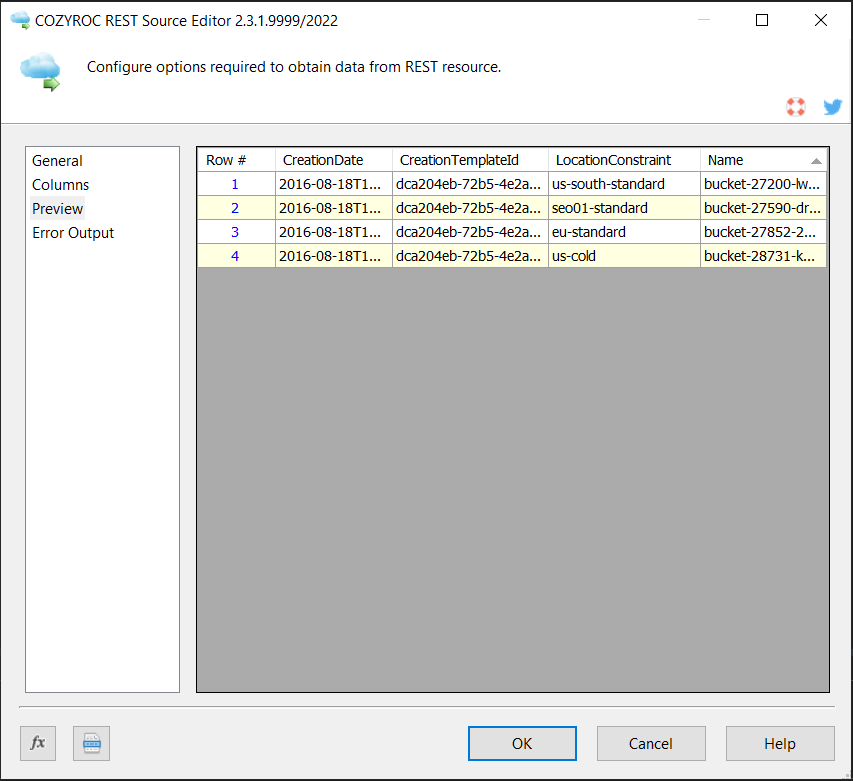
Step 5. Click "Preview" tab to make sure all necessary resource columns are included.
In this guide, we will show how to write data to the IBM Cloud Storage service resource using the COZYROC REST Destination component.
Step 1. Select an existing or create a new "Data Flow Task".
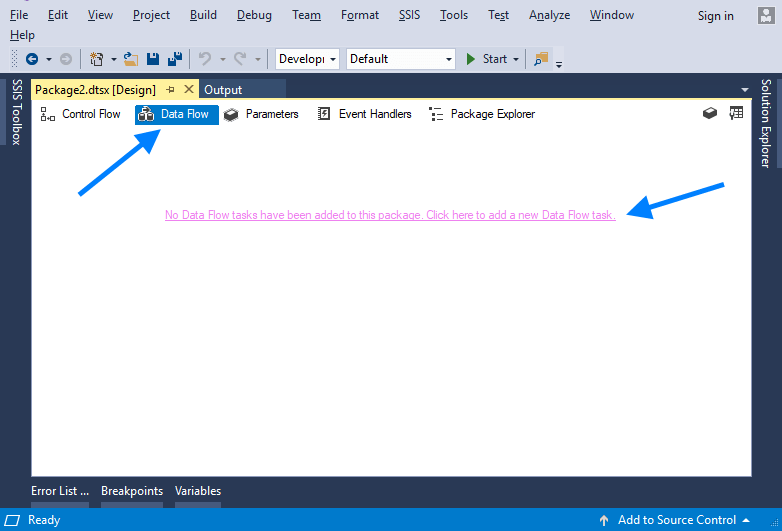
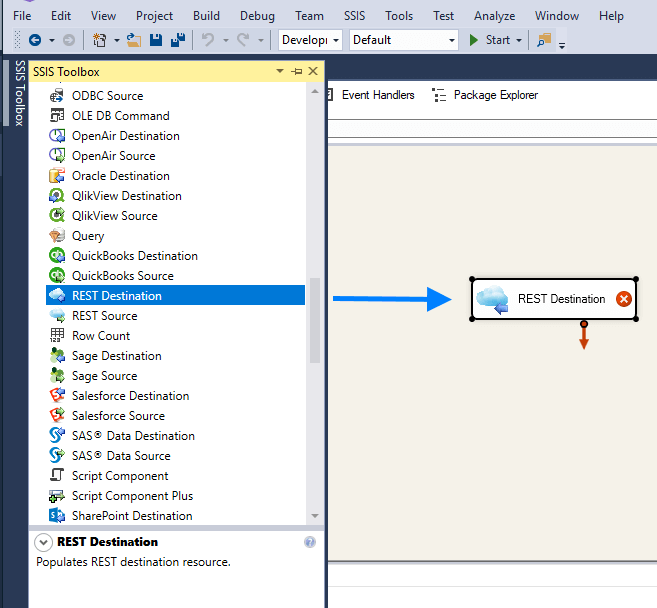
Step 2. Open the "SSIS Toolbox" and drag and drop COZYROC "REST Destination" component.
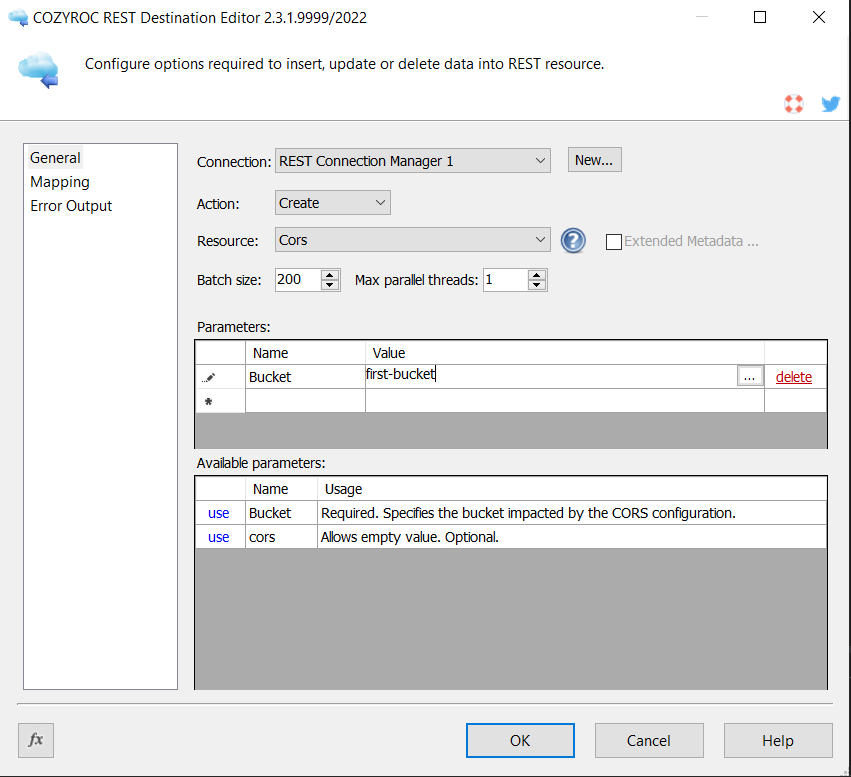
Step 3. Double click on the "REST Destination" component and select IBM Cloud Storage connection from the list. Also, select resource action and the IBM Cloud Storage resource you want to work on.
Step 4. Click on the "Mapping" tab and map the input columns for the process you are configuring.
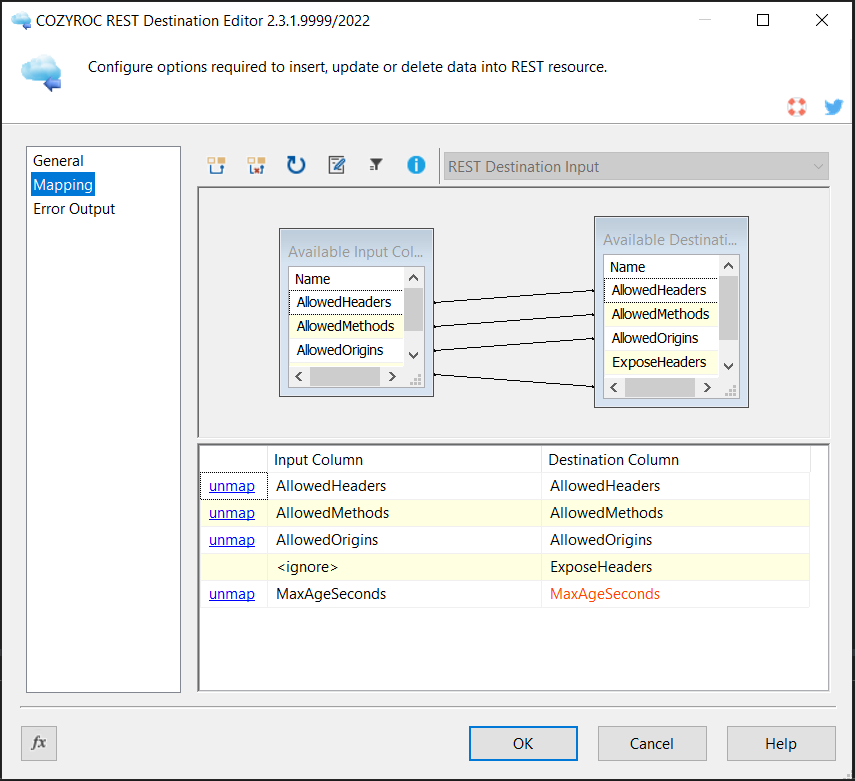
Done! You have now learned how to write data into the IBM Cloud Storage Service resource.
Configuration
Base URL address: https://s3.[REGION].cloud-object-storage.appdomain.cloud/[BUCKET].
- IAM
-
The authentication uses a session token.
The authentication has the following user-defined parameters:
- apikey: Required. The API key.
- ibm-service-instance-id: Required. The IBM instance id.
The following request parameters will be automatically processed during the authentication process:
-
Authorization:
Bearer {{=token.Access}} -
ibm-service-instance-id:
{{=connection.user['ibm-service-instance-id']}}
Documentation: https://cloud.ibm.com/docs/account?topic=account-iamtoken_from_apikey.
- HMAC
-
The authentication uses a parameters-based authentication.
The authentication has the following user-defined parameters:
- Access Key: Required. Specify access key.
- Secret Key: Required. Specify secret key.
The following request parameters will be automatically processed during the authentication process:
-
Authorization:
{{=IBM.authorizationHeader(request, connection)}} -
host:
{{=request.signedRequest.headers['host']}} -
x-amz-date:
{{=request.signedRequest.headers['x-amz-date']}} -
x-amz-content-sha256:
{{=request.signedRequest.headers['x-amz-content-sha256'] || undefined}} -
Content-Type:
{{=request.signedRequest.headers['Content-Type']}}
Documentation: https://docs.aws.amazon.com/general/latest/gr/signature-version-4.html.
Based on resource template BaseServiceIdWithoutBucket.
- [Read] action
-
Endpoint URL address:
/.
The result is extracted from:{{=utils.ensureArray(response.ListAllMyBucketsResult.Buckets.Bucket)}}.The action has the following user-defined parameters:
- extended: The returned listing will also include the provisioning code (LocationConstraint) for each bucket. Optional.
Documentation: https://cloud.ibm.com/apidocs/cos/cos-compatibility#listbuckets.
- [Create] action
-
Endpoint URL address:
/{{=item.Name}}.
The action uses PUT method.The action has the following user-defined parameters:
- ibm-sse-kp-encryption-algorithm: The algorithm and key size used to for the managed encryption root key. Optional.
- ibm-sse-kp-customer-root-key-crn: The CRN of the root key used to encrypt the bucket. Optional.
The following request parameters will be automatically processed:
-
ibm-sse-kp-encryption-algorithm:
{{=parameters['ibm-sse-kp-encryption-algorithm']}} -
ibm-sse-kp-customer-root-key-crn:
{{=parameters['ibm-sse-kp-customer-root-key-crn']}}
Documentation: https://cloud.ibm.com/apidocs/cos/cos-compatibility#createbucket.
- [Delete] action
-
Endpoint URL address:
/{{=item.Name}}.Documentation: https://cloud.ibm.com/apidocs/cos/cos-compatibility#deletebucket.
The resource includes the fields from the Bucket template.
Based on resource template BaseServiceIdWithoutBucket.
- [Delete] action
-
Endpoint URL address:
/{{=parameters.Bucket}}?delete.
The action uses POST method.The action has the following user-defined parameters:
- Bucket: Required. The bucket name containing the objects to delete.
- Quiet: Element to enable quiet mode for the request. Optional.
The following request parameters will be automatically processed:
-
text/xml:
{{=json2xml({ Delete: {Object: batch}, Quiet: parameters.get('Quiet', undefined) }) }}
Documentation: https://cloud.ibm.com/apidocs/cos/cos-compatibility#deleteobjects.
- Key
Template: ShortText.
Based on resource template BaseServiceIdWithoutBucket.
- [Read] action
-
Endpoint URL address:
/{{=parameters.Bucket}}?lifecycle={{=parameters.get('lifecycle', '')}}.
The result is extracted from:{{=response.Rules}}.The action has the following user-defined parameters:
- Bucket: Required. The name of the bucket for which to get the lifecycle information.
- lifecycle: Allows empty value. Optional.
Documentation: https://cloud.ibm.com/apidocs/cos/cos-compatibility#getbucketlifecycleconfiguration.
- [Create] action
-
Endpoint URL address:
/{{=parameters.Bucket}}?lifecycle={{=parameters.get('lifecycle', '')}}.
The action uses PUT method.The action has the following user-defined parameters:
- Bucket: Required. The name of the bucket for which to set the configuration.
- lifecycle: Allows empty value. Optional.
The following request parameters will be automatically processed:
-
text/xml:
{{=json2xml({ LifecycleConfiguration: {Rule: batch} }) }}
Documentation: https://cloud.ibm.com/apidocs/cos/cos-compatibility#putbucketlifecycleconfiguration.
- [Update] action
-
Endpoint URL address:
/{{=parameters.Bucket}}/{{=item.Key}}?restore.The action has the following user-defined parameters:
- Bucket: Required. The name of the bucket for which to set the configuration.
The following request parameters will be automatically processed:
-
text/xml:
{{=json2xml({ RestoreRequest: item }) }}
Documentation: https://cloud.ibm.com/apidocs/cos/cos-compatibility#restoreobject.
- [Delete] action
-
Endpoint URL address:
/{{=parameters.Bucket}}?lifecycle={{=parameters.get('lifecycle', '')}}.The action has the following user-defined parameters:
- Bucket: Required. The bucket name of the lifecycle to delete.
- lifecycle: Allows empty value. Optional.
Documentation: https://cloud.ibm.com/apidocs/cos/cos-compatibility#deletebucketlifecycle.
The resource includes the fields from the LifecycleRule template.
Based on resource template BaseServiceIdWithoutBucket.
- [Read] action
-
Endpoint URL address:
/{{=parameters.Bucket}}?replication={{=parameters.get('replication', '')}}.
The result is extracted from:{{=response.Rules}}.The action has the following user-defined parameters:
- Bucket: Required. The name of the bucket for which to get the replication information.
- replication: Allows empty value. Optional.
Documentation: https://cloud.ibm.com/apidocs/cos/cos-compatibility#getbucketreplicationconfiguration.
- [Create] action
-
Endpoint URL address:
/{{=parameters.Bucket}}?replication={{=parameters.get('replication', '')}}.
The action uses PUT method.The action has the following user-defined parameters:
- Bucket: Required. The name of the bucket for which to set the configuration.
- replication: Allows empty value. Optional.
The following request parameters will be automatically processed:
-
text/xml:
{{=json2xml({ ReplicationConfiguration: {Rule: batch} }) }}
Documentation: https://cloud.ibm.com/apidocs/cos/cos-compatibility#putbucketreplication.
- [Delete] action
-
Endpoint URL address:
/{{=parameters.Bucket}}?replication={{=parameters.get('replication', '')}}.The action has the following user-defined parameters:
- Bucket: Required. The bucket name of the replication to delete.
- replication: Allows empty value. Optional.
Documentation: https://cloud.ibm.com/apidocs/cos/cos-compatibility#deletebucketreplication.
The resource includes the fields from the ReplicationRule template.
Based on resource template BaseServiceIdWithoutBucket.
- [Create] action
-
Endpoint URL address:
/{{=parameters.Bucket}}?protection={{=parameters.get('protection', '')}}.
The action uses PUT method.The action has the following user-defined parameters:
- Bucket: Required. The name of the bucket for which to set the configuration.
- replication: Allows empty value. Optional.
The following request parameters will be automatically processed:
-
text/xml:
{{=json2xml({ Protection: item }) }}
Documentation: https://cloud.ibm.com/apidocs/cos/cos-compatibility#putbucketprotectionconfiguration.
The resource includes the fields from the Protection template.
Based on resource template BaseServiceIdWithoutBucket.
- [Read] action
-
Endpoint URL address:
/{{=parameters.Bucket}}?website={{=parameters.get('website', '')}}.
The result is extracted from:{{=[response]}}.The action has the following user-defined parameters:
- Bucket: Required. The bucket name for which to get the website configuration.
- website: Allows empty value. Optional.
Documentation: https://cloud.ibm.com/apidocs/cos/cos-compatibility#getbucketwebsite.
- [Create] action
-
Endpoint URL address:
/{{=parameters.Bucket}}?website={{=parameters.get('website', '')}}.
The action uses PUT method.The action has the following user-defined parameters:
- Bucket: Required. The bucket that will serve a static website.
- website: Allows empty value. Optional.
The following request parameters will be automatically processed:
-
text/xml:
{{=json2xml({ WebsiteConfiguration: item }) }}
Documentation: https://cloud.ibm.com/apidocs/cos/cos-compatibility#putbucketwebsite.
- [Delete] action
-
Endpoint URL address:
/{{=parameters.Bucket}}?website={{=parameters.get('website', '')}}.The action has the following user-defined parameters:
- Bucket: Required. The bucket for which you want to remove the website configuration.
- website: Allows empty value. Optional.
Documentation: https://cloud.ibm.com/apidocs/cos/cos-compatibility#deletebucketwebsite.
The resource includes the fields from the Website template.
Based on resource template BaseServiceIdWithoutBucket.
- [Read] action
-
Endpoint URL address:
/{{=parameters.Bucket}}?cors={{=parameters.get('cors', '')}}.
The result is extracted from:{{=response.CORSRules}}.The action has the following user-defined parameters:
- Bucket: Required. The bucket name for which to get the CORS configuration.
- cors: Allows empty value. Optional.
Documentation: https://cloud.ibm.com/apidocs/cos/cos-compatibility#getbucketcors.
- [Create] action
-
Endpoint URL address:
/{{=parameters.Bucket}}?cors={{=parameters.get('cors', '')}}.The action has the following user-defined parameters:
- Bucket: Required. Specifies the bucket impacted by the CORS configuration.
- cors: Allows empty value. Optional.
The following request parameters will be automatically processed:
-
text/xml:
{{=json2xml({ CORSConfiguration: {CORSRule: batch} }) }}
Documentation: https://cloud.ibm.com/apidocs/cos/cos-compatibility#putbucketcors.
- [Delete] action
-
Endpoint URL address:
/{{=parameters.Bucket}}?cors={{=parameters.get('cors', '')}}.The action has the following user-defined parameters:
- Bucket: Required. Specifies the bucket whose CORS configuration is being deleted.
- cors: Allows empty value. Optional.
Documentation: https://cloud.ibm.com/apidocs/cos/cos-compatibility#deletebucketcors.
The resource includes the fields from the CORSRule template.
Based on resource template BaseServiceIdWithoutBucket.
- [Read] action
-
Endpoint URL address:
/{{=parameters.Bucket}}/{{=parameters.Key}}?tagging={{=parameters.get('tagging', '')}}.
The result is extracted from:{{=response.TagSet}}.The action has the following user-defined parameters:
- Bucket: Required. The bucket containing the object.
- Key: Required. Object key for which to get the tagging information.
- tagging: Allows empty value. Optional.
Documentation: https://cloud.ibm.com/apidocs/cos/cos-compatibility#getobjecttagging.
- [Create] action
-
Endpoint URL address:
/{{=parameters.Bucket}}/{{=parameters.Key}}?tagging={{=parameters.get('tagging', '')}}.The action has the following user-defined parameters:
- Bucket: Required. The bucket containing the object.
- Key: Required. Name of the object key.
- tagging: Allows empty value. Optional.
The following request parameters will be automatically processed:
-
text/xml:
{{=json2xml({ Tagging: {TagSet: batch} }) }}
Documentation: https://cloud.ibm.com/apidocs/cos/cos-compatibility#putobjecttagging.
- [Delete] action
-
Endpoint URL address:
/{{=parameters.Bucket}}/{{=parameters.Key}}?tagging={{=parameters.get('tagging', '')}}.The action has the following user-defined parameters:
- Bucket: Required. The bucket that contains the object.
- Key: Required. Name of the object key.
- tagging: Allows empty value. Optional.
Documentation: https://cloud.ibm.com/apidocs/cos/cos-compatibility#putobjecttagging.
The resource includes the fields from the TagSet template.
Based on resource template BaseServiceIdWithoutBucket.
- [Read] action
-
Endpoint URL address:
/{{=parameters.Bucket}}?publicAccessBlock={{=parameters.get('publicAccessBlock', '')}}.
The result is extracted from:{{=[response]}}.The action has the following user-defined parameters:
- Bucket: Required. The name of the IBM COS bucket whose `PublicAccessBlock` configuration you want to retrieve.
- publicAccessBlock: Allows empty value. Optional.
Documentation: https://cloud.ibm.com/apidocs/cos/cos-compatibility#getpublicaccessblock.
- [Create] action
-
Endpoint URL address:
/{{=parameters.Bucket}}?publicAccessBlock={{=parameters.get('publicAccessBlock', '')}}.The action has the following user-defined parameters:
- Bucket: Required. The name of the IBM COS bucket whose `PublicAccessBlock` configuration you want to set.
- publicAccessBlock: Allows empty value. Optional.
The following request parameters will be automatically processed:
-
text/xml:
{{=json2xml({ PublicAccessBlockConfiguration: batch }) }}
Documentation: https://cloud.ibm.com/apidocs/cos/cos-compatibility#putpublicaccessblock.
- [Delete] action
-
Endpoint URL address:
/{{=parameters.Bucket}}?publicAccessBlock={{=parameters.get('publicAccessBlock', '')}}.The action has the following user-defined parameters:
- Bucket: Required. The IBM COS bucket whose `PublicAccessBlock` configuration you want to delete.
- publicAccessBlock: Allows empty value. Optional.
Documentation: https://cloud.ibm.com/apidocs/cos/cos-compatibility#deletepublicaccessblock.
The resource includes the fields from the PublicAccessBlockConfiguration template.
- [Read] action
-
The result is extracted from:{{=response}}.
The result is paginated.The following request parameters will be automatically processed:
-
_includeUserParameters:
{{=parameters}}
-
_includeUserParameters:
- [Create] action
-
The action uses POST method.The following request parameters will be automatically processed:
-
application/json:
{{=item}}
-
application/json:
- [Update] action
-
The action uses PUT method.The following request parameters will be automatically processed:
-
application/json:
{{=item}}
-
application/json:
- [Upsert] action
-
The action uses PATCH method.The following request parameters will be automatically processed:
-
application/json:
{{=item}}
-
application/json:
- [Delete] action
-
The action uses DELETE method.
Based on resource template Base.
- [Read] action
-
The following request parameters will be automatically processed:
-
ibm-service-instance-id:
{{=connection.user['ibm-service-instance-id']}}
-
ibm-service-instance-id:
- [Create] action
-
The action uses POST method.The following request parameters will be automatically processed:
-
ibm-service-instance-id:
{{=connection.user['ibm-service-instance-id']}}
-
ibm-service-instance-id:
- [Update] action
-
The action uses PUT method.The following request parameters will be automatically processed:
-
ibm-service-instance-id:
{{=connection.user['ibm-service-instance-id']}}
-
ibm-service-instance-id:
- [Upsert] action
-
The action uses PATCH method.The following request parameters will be automatically processed:
-
ibm-service-instance-id:
{{=connection.user['ibm-service-instance-id']}}
-
ibm-service-instance-id:
- [Delete] action
-
The action uses DELETE method.The following request parameters will be automatically processed:
-
ibm-service-instance-id:
{{=connection.user['ibm-service-instance-id']}}
-
ibm-service-instance-id:
Based on resource template Base.
- ShortText
Data type: DT_WSTR ( length 255 )
- LongText
Data type: DT_WSTR ( length 1000 )
- DateTime
Data type: DT_DBTIMESTAMP
- Int
Data type: DT_I4
- Date
Data type: DT_DBDATE
- Bool
Data type: DT_BOOL
- Bucket
Field components:
-
Uses template:
ShortText. - Contains the following components: Name, CreationDate, LocationConstraint, CreationTemplateId.
-
Uses template:
- CommonPrefix
Field components:
-
Uses template:
ShortText. - Contains the following components: Prefix.
-
Uses template:
- CommonPrefixList
Template: CommonPrefix. An array field.
- CompletedPart
Field components:
-
Uses template:
ShortText. - Contains the following components: ETag, PartNumber.
-
Uses template:
- CompletedPartList
Template: CompletedPart. An array field.
- Condition
Field components:
-
Uses template:
ShortText. - Contains the following components: HttpErrorCodeReturnedEquals, KeyPrefixEquals.
-
Uses template:
- CORSRule
Field components:
-
Uses template:
ShortText. - Contains the following components: AllowedHeaders, AllowedMethods, AllowedOrigins, ExposeHeaders, MaxAgeSeconds.
-
Uses template:
- ErrorDocument
Field components:
-
Uses template:
ShortText. - Contains the following components: Key.
-
Uses template:
- ExposeHeaders
Template: ShortText. An array field.
- Website
Field components:
-
Uses template:
RedirectAllRequestsTo. - Contains the following components: RedirectAllRequestsTo, IndexDocument, ErrorDocument, RoutingRules.
-
Uses template:
- Grant
Field components:
-
Uses template:
Grantee. - Contains the following components: Grantee, Permission.
-
Uses template:
- Grantee
Field components:
-
Uses template:
ShortText. - Contains the following components: DisplayName, EmailAddress, ID, Type, URI.
-
Uses template:
- Grants
Template: Grant. An array field.
- IndexDocument
Field components:
-
Uses template:
ShortText. - Contains the following components: Suffix.
-
Uses template:
- LifecycleExpiration
Field components:
-
Uses template:
Date. - Contains the following components: Date, Days, ExpiredObjectDeleteMarker.
-
Uses template:
- RestoreRequest
Field components:
-
Uses template:
ShortText. - Contains the following components: Key, Days, Type, Tier, Description, OutputLocation.
-
Uses template:
- LifecycleRule
Template: RestoreRequest. Field components:
-
Uses template:
LifecycleExpiration. - Contains the following components: Expiration, ID, Prefix, Filter, Status, Transitions.
-
Uses template:
- LifecycleRuleFilter
Field components:
-
Uses template:
ShortText. - Contains the following components: Prefix, Tag, And.
-
Uses template:
- LifecycleRuleAndOperator
Field components:
-
Uses template:
ShortText. - Contains the following components: Prefix, Tags.
-
Uses template:
- MetadataEntry
Field components:
-
Uses template:
ShortText. - Contains the following components: Name, Value.
-
Uses template:
- ObjectCannedACL
Template: ShortText.
- OutputLocation
Field components:
-
Uses template:
S3Location. - Contains the following components: S3.
-
Uses template:
- Permission
Template: ShortText.
- Protection
Field components:
-
Uses template:
ShortText. - Contains the following components: status, minimumRetention, maximumRetention, defaultRetention.
-
Uses template:
- PublicAccessBlockConfiguration
Field components:
-
Uses template:
Bool. - Contains the following components: BlockPublicAcls, IgnorePublicAcls.
-
Uses template:
- Redirect
Field components:
-
Uses template:
ShortText. - Contains the following components: HostName, HttpRedirectCode, Protocol, ReplaceKeyPrefixWith, ReplaceKeyWith.
-
Uses template:
- RedirectAllRequestsTo
Field components:
-
Uses template:
ShortText. - Contains the following components: HostName, Protocol.
-
Uses template:
- ReplicationRule
Field components:
-
Uses template:
ShortText. - Contains the following components: ID, Priority, Filter, Status, Destination, DeleteMarkerReplication.
-
Uses template:
- RoutingRule
Field components:
-
Uses template:
Condition. - Contains the following components: Condition, Redirect.
-
Uses template:
- RoutingRules
Template: RoutingRule. An array field.
- S3Location
Field components:
-
Uses template:
ShortText. - Contains the following components: BucketName, Prefix, CannedACL, AccessControlList, Tagging, UserMetadata, StorageClass.
-
Uses template:
- Tag
Field components:
-
Uses template:
ShortText. - Contains the following components: Key, Value.
-
Uses template:
- Tagging
Field components:
-
Uses template:
TagSet. - Contains the following components: TagSet.
-
Uses template:
- TagSet
Template: Tag. An array field.
- Transition
Field components:
-
Uses template:
Date. - Contains the following components: Date, Days, StorageClass.
-
Uses template:
- TransitionList
Template: Transition. An array field.
- UserMetadata
Template: MetadataEntry. An array field.
Knowledge Base
What's New
- New: Introduced connection.
Related documentation


COZYROC SSIS+ Components Suite is free for testing in your development environment.
A licensed version can be deployed on-premises, on Azure-SSIS IR and on COZYROC Cloud.