
Overview

Configuration is provided for establishing connections with the ClickHouse service. The configuration is used in the REST Connection Manager.
Setup
Press  icon to get more information about the connection parameters.
Obtain data
Use REST Source component to read data from ClickHouse.
Insert data
Use REST Destination component to insert/update/delete rows in a ClickHouse table.
Quick Start
Please review the official ClickHouse documentation here.
Step 1. Select the service you wish to integrate with COZYROC and in the left pane press Connect.
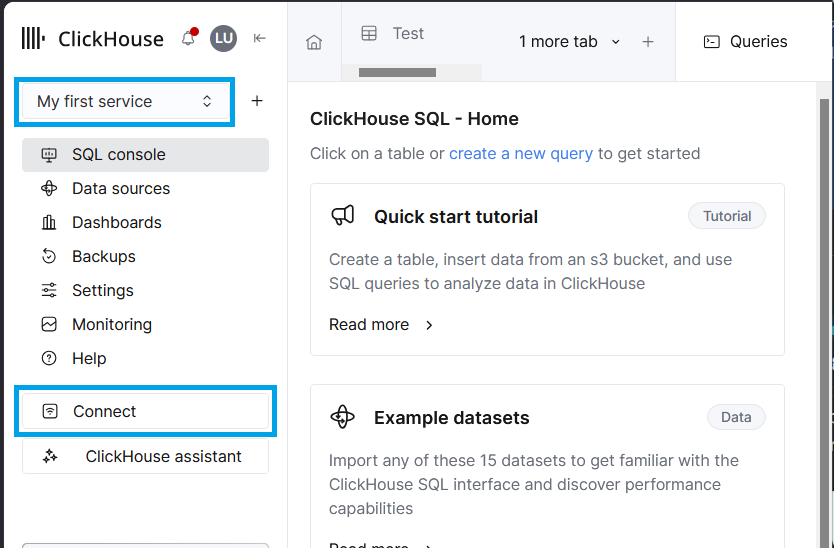
Step 2. In the Connect window select HTTP and if you already have your password proceed with the next Quick Start section - Establish Connection. You can enter the username and password in the COZYROC REST CM.
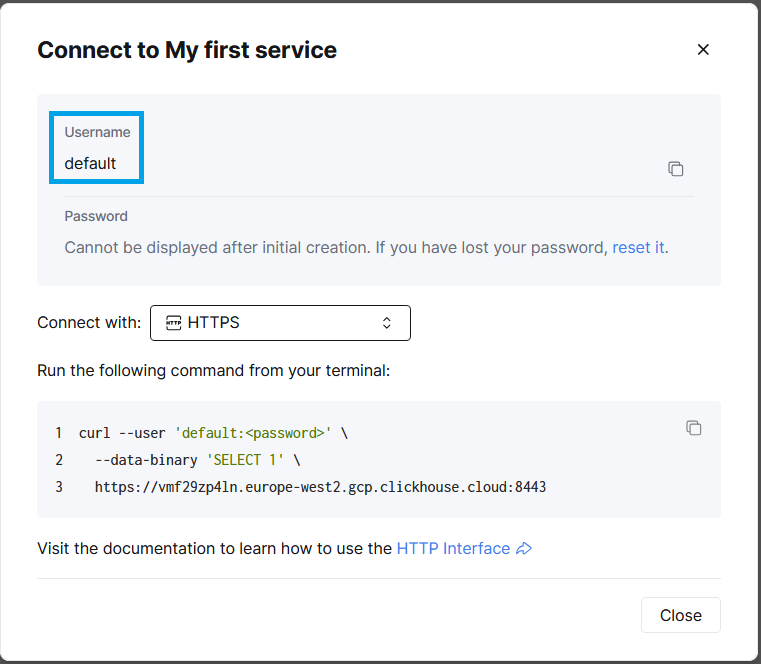
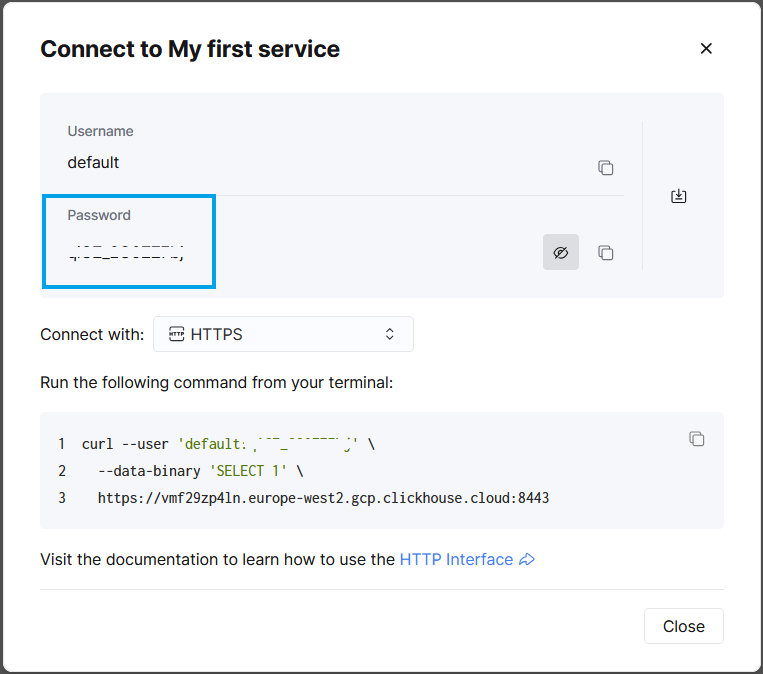
Step 3. If you are not aware of your password, press reset it and copy the randomly generated string to the connection manager.
NOTE: This will invalidate all connections that were already utilizing the user/password.
In this task, we will show you step-by-step how to create a connection to the ClickHouse REST API using COZYROC's REST Connection Manager.
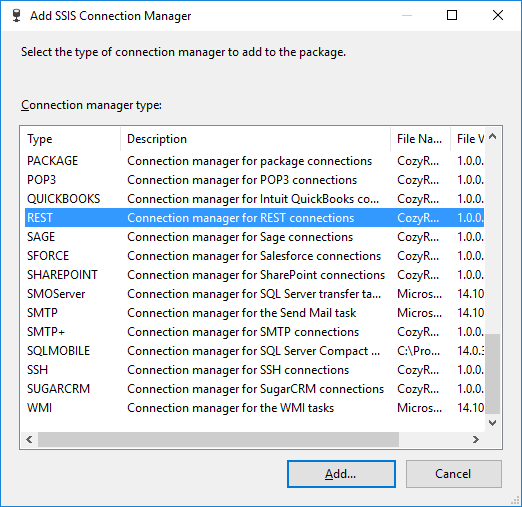
Step 1. Run "Visual Studio". Right click on Connection managers tab and select New Connection. In Add SSIS Connection Manager dialog scroll down, select REST connection manager from the list and then click Add.
Step 2. From the drop-down menu Configuration select ClickHouse. Enter a valid URL, it can be retrieved from the ClickHouse UI if you are using a cloud instance. For local instances it is the ip/hostname followed by a port, 8443 by default.
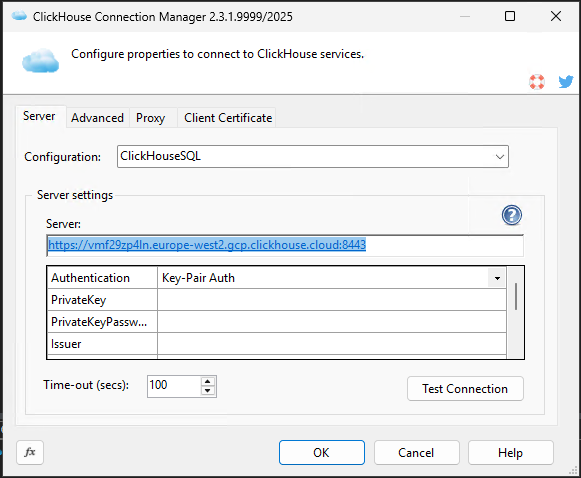
Step 3. Enter authentication details, either the headers and key for the Key-Pair authentication or simply the username and password for the Basic authentication.
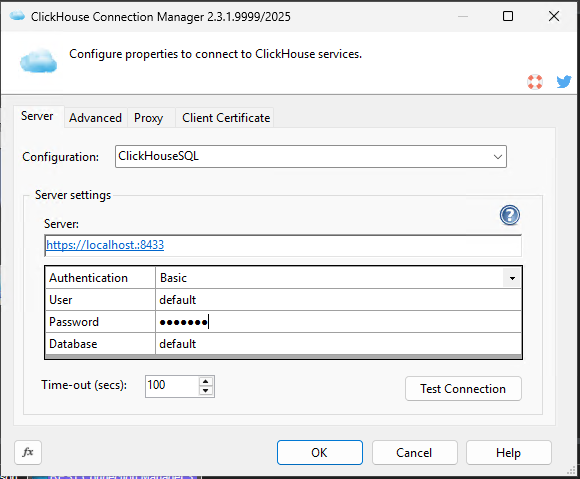
Congratulations! You have successfully created a connection to the ClickHouse API using COZYROC's REST Connection Manager.
In this guide, we will show you how to read data from the ClickHouse API resource using the COZYROC REST Source component.
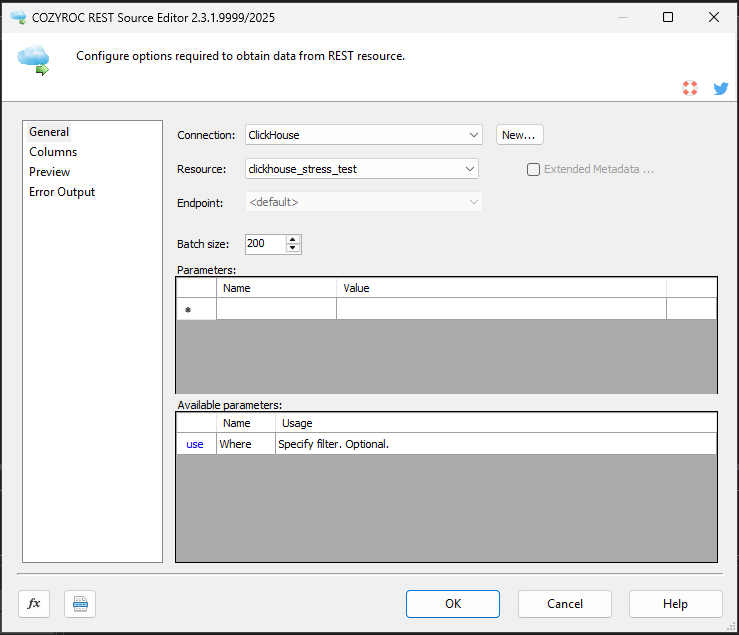
Step 1. Double click on the "REST Source" component and select the ClickHouse connection from the list. Select from the available resources in the Resource list. If you want to have a statement that is different from the default SELECT * FROM [Your table name], use the Custom Query resource.
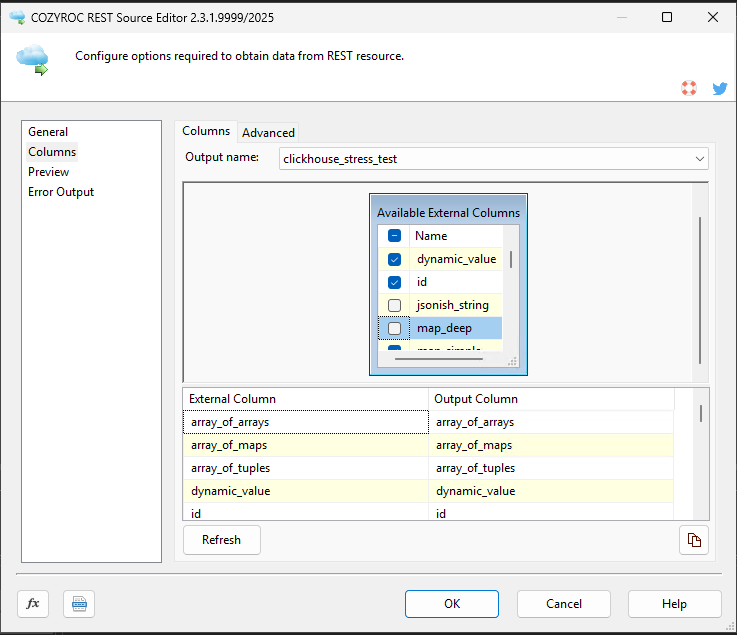
Step 2. Click on the "Columns" tab and select the ClickHouse columns you want to read.
Step 3. Click "Preview" to make sure all necessary resource columns are included and you are consuming the data successfully.
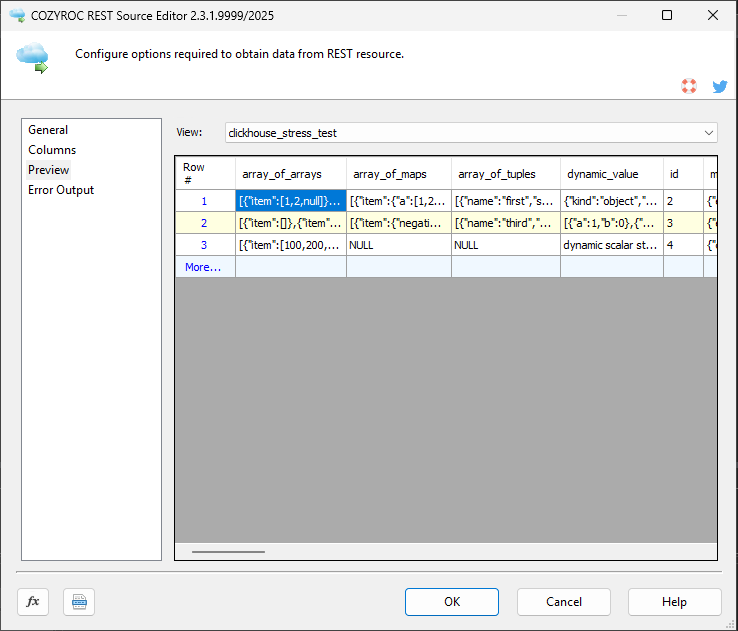
Bravo! You have now learned how to read data from the ClickHouse service.
In this guide, we will show you how to write data to the ClickHouse service resource using the COZYROC REST Destination component.
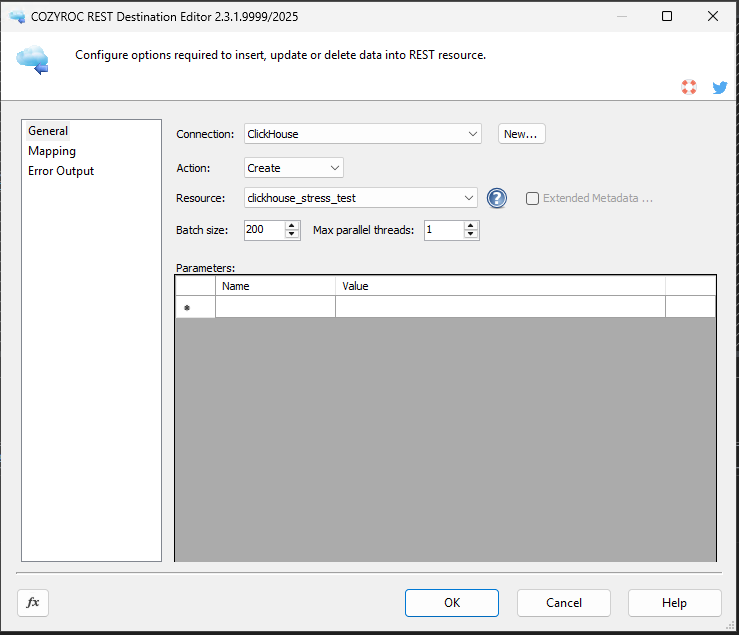
Step 1. Double click on the "REST Destination" component and select the ClickHouse connection from the list. Then select the action you will be performing with your data and select the target Resource.
Step 2. Click on the "Mapping" tab and map the input columns for the process you are configuring. If you want to provide input for other resource composite objects, change the input above and map the columns.
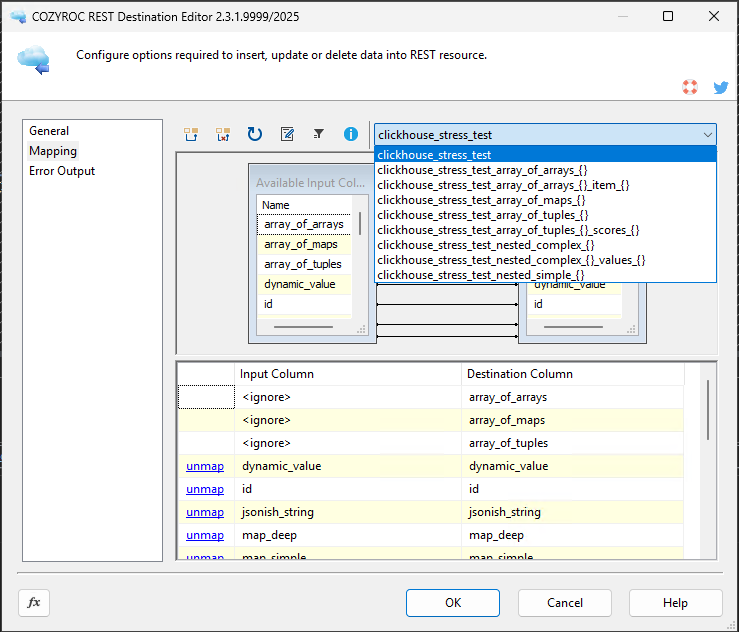
Done. You have now learned how to write data into a ClickHouse resource.
Configuration
Base URL address: https://[HOST]:[PORT].
- Key-Pair Auth
-
The authentication uses a parameters-based authentication.
The authentication has the following user-defined parameters:
- PrivateKey: Required. Select private key file (p12/pfx).
- PrivateKeyPassword: Required. The password for the PFX file.
- Issuer: Required. Matched against the provider’s expected issuer.
- Subject: Required. Will be a part of the generated username.
- Audience: Required. Matched against the provider’s expected audience.
- Database: Required. Specify a database.
- KeyID: Will be attached to the token header as "kid" enabling the use of JWKS. Optional
- Grants: A pipe separated array of SQL GRANT fragments, e.g. SELECT ON db.* | INSERT ON db.table1. Optional.
- Roles: A pipe separated array of role names to assign, e.g. analyst | reader. Optional.
The following request parameters will be automatically processed during the authentication process:
-
Authorization:
Bearer {{=ClickHouse.KeyAuth.generateJWT()}} -
X-ClickHouse-Database:
{{=connection.user.Database}} -
X-ClickHouse-Format:
JSON
Documentation: https://clickhouse.com/docs/concepts/features/security/external-authenticators/jwt.
- Basic
-
The authentication uses a parameters-based authentication.
The authentication has the following user-defined parameters:
- User: Required. Specify the X-ClickHouse-User.
- Password: Specify the X-ClickHouse-Key. Optional.
- Database: Required. Specify a database.
The following request parameters will be automatically processed during the authentication process:
-
X-ClickHouse-User:
{{=connection.user.User}} -
X-ClickHouse-Key:
{{=connection.user.Password}} -
X-ClickHouse-Database:
{{=connection.user.Database}} -
X-ClickHouse-Format:
JSON
Documentation: https://clickhouse.com/docs/interfaces/http.
Based on resource template Base.
- [Read] action
-
The result is extracted from:{{=ClickHouse.getData(resource, parameters)}}.The action has the following user-defined parameters:
- Statement: Required. ClickHouse standard SQL statement. Do not use "LIMIT" manually, it will be added according to the "Batch Size" value.
Documentation: https://clickhouse.com/docs/interfaces/http#querying.
- [External]
-
The external fields list is extracted from:
{{=ClickHouse.getCustomQueryFields(parameters)}}.
- [Read] action
-
The result is extracted from:{{=ClickHouse.getData(resource, parameters)}}.The action has the following user-defined parameters:
- Where: Specify filter. Optional.
The following request parameters will be automatically processed:
-
offset:
{{=parameters.iterator}} -
limit:
{{=parameters.batchSize}}
- [Create] action
-
Endpoint URL address:
.
The result is extracted from:{{=ClickHouse.create(resource, parameters, batch)}}.Documentation: https://clickhouse.com/docs/sql-reference/statements/insert-into.
- [Update] action
-
Endpoint URL address:
.
The result is extracted from:{{=ClickHouse.update(resource, parameters, item)}}.
The action uses POST method.The action has the following user-defined parameters:
- Columns: Specify comma-separated key fields used to build the WHERE clause. Required unless Where is specified.
- Where: Additional ClickHouse WHERE condition, do not actually include the WHERE keyword. Optional.
Documentation: https://clickhouse.com/docs/sql-reference/statements/alter/update.
- [Delete] action
-
Endpoint URL address:
.
The result is extracted from:{{=ClickHouse.delete(resource, parameters, item)}}.
The action uses POST method.The action has the following user-defined parameters:
- Columns: Specify comma-separated key fields used to build the WHERE clause. Required unless Where is specified.
- Where: Additional ClickHouse WHERE condition, do not actually include the WHERE keyword. Optional.
Documentation: https://clickhouse.com/docs/sql-reference/statements/alter/delete.
- [External]
-
The external fields list is extracted from:
{{=ClickHouse.getTableFields(resource)}}.
The external resource list is extracted from: {{=ClickHouse.getTables()}}.
Based on resource template Base.
- [Read] action
-
The result is paginated.The following request parameters will be automatically processed:
-
_includeUserParameters:
{{=parameters}}
-
_includeUserParameters:
- [Create] action
-
The action uses POST method.The following request parameters will be automatically processed:
-
X-ClickHouse-Format:
default -
application/json:
{{=item}}
-
X-ClickHouse-Format:
- [Update] action
-
The action uses PATCH method.The following request parameters will be automatically processed:
-
application/json:
{{=item}}
-
application/json:
- [Upsert] action
-
The action uses PATCH method.The following request parameters will be automatically processed:
-
application/json:
{{=item}}
-
application/json:
- [Delete] action
-
The action uses DELETE method.
- ShortText
Data type: DT_WSTR ( length 250 )
- LongText
Data type: DT_WSTR ( length 1000 )
- DateTime
Data type: DT_DBTIMESTAMP2 Before setting, the value is processed with
{{=value && value.toISOString().replace('Z', '').substring(0, 19)}}expression.- DateTime64
Data type: DT_DBTIMESTAMP2 Before setting, the value is processed with
{{=value && value.toISOString().replace('Z', '')}}expression.- Date
Data type: DT_DBDATE Before setting, the value is processed with
{{=value && value.toISOString().substring(0, 10)}}expression.- Bool
Data type: DT_BOOL
- Int8
Data type: DT_I2
- Int16
Data type: DT_I2
- Int32
Data type: DT_I4
- Int64
Data type: DT_I8
- BigNumber
Data type: DT_WSTR ( length 80 )
- Float
Data type: DT_R4
- Double
Data type: DT_R8
- Decimal
Data type: DT_DECIMAL
Knowledge Base
What's New
- New: Introduced connection.
Related documentation


COZYROC SSIS+ Components Suite is free for testing in your development environment.
A licensed version can be deployed on-premises, on Azure-SSIS IR and on COZYROC Cloud.